
For each client entity, a Brazilian accounting firm needs the same documents every cycle. They live in two federal systems with no API. An agent inside Turing takes the request in chat, drives ReceitaNetBX, and returns the files with a run log.
- Client
- Accounting and tax firm managing hundreds of client entities (Brazil)
- Industry
- Accounting · Tax
- Problem
- Every cycle, for every client, an analyst logs into two federal systems, one web portal and one Windows desktop app, and downloads the same set of documents by hand
- Solution
- An agent inside Turing that receives the request in natural language, drives the government systems under the client's electronic power of attorney, resolves amended filings, and returns the files with a run log
- Stack
- Turing chat + agent runtime · RPA on a Windows machine in AWS (sa-east-1) · GOV.BR + digital certificate authentication · ECAC portal automation · ReceitaNetBX desktop automation · download-queue monitor · encrypted delivery to the firm's SFTP / bucket · per-run JSON log
- Stage
- ReceitaNetBX module in use (screens below); ECAC module specified and in development
For each client entity, a Brazilian accounting firm needs the same documents every cycle: the fiscal status certificate, DCTF filings, the payment history, the withholding-source report, and up to five years of digital bookkeeping files (SPED: Contribuições/PIS-COFINS, Fiscal ICMS/IPI, ECD, ECF). They live in two federal systems, and neither has an API.
ECAC is a web portal behind the GOV.BR identity layer and a digital certificate. The analyst signs in with the certificate (company e-CNPJ, or an employee certificate covered by the power of attorney), picks “Proxy (CNPJ)” from the login options - the right choice in 99% of cases - selects the client, and downloads four PDFs from four different modules.
ReceitaNetBX is a Windows desktop application. The analyst selects the certificate, selects the proxy, types the client's CNPJ, chooses the bookkeeping module, sets a period (five years back from the first of the month to today), runs the search, selects every file except EFD-Reinf, adds them to the download queue, watches the queue, and handles the results. When a filing was rectified, the list shows both the original and the rectifying version, and the analyst decides which one counts.
Then everything is renamed and filed. Hours per client. Hundreds of clients. The same clicks every month.
- A request in plain language (“download the bookkeeping for client X for the last five years”), not a form
- Fully unattended execution under the client's electronic power of attorney, with the certificate handled safely
- Both systems in one agent: the web portal and the desktop app
- Correct handling of rectified filings: keep both versions, treat the last transmitted as authoritative
- Period, module and exclusion rules configurable per request, without a code change
- Files delivered where the firm already works (SFTP / bucket), with a history a manager can audit
- A failure that reports itself instead of a queue that silently stalls
- Analyst time inside the portals per client entity: hours → zero
- Every run recorded with CNPJ, SPED type, period, file count, status, and requester
- Rectified filings resolved by rule, not by hand
- Nothing sensitive left on the processing machine after the run
- 01
Ask in chat, receive a folder
The agent is a Turing skill. The user attaches “Receitanet” as a source, asks for the documents, and the agent fills in what the request left out. If the CNPJ, the module or the period is missing, it asks in the same thread. When the run finishes, it replies with a summary and the path where the files landed.
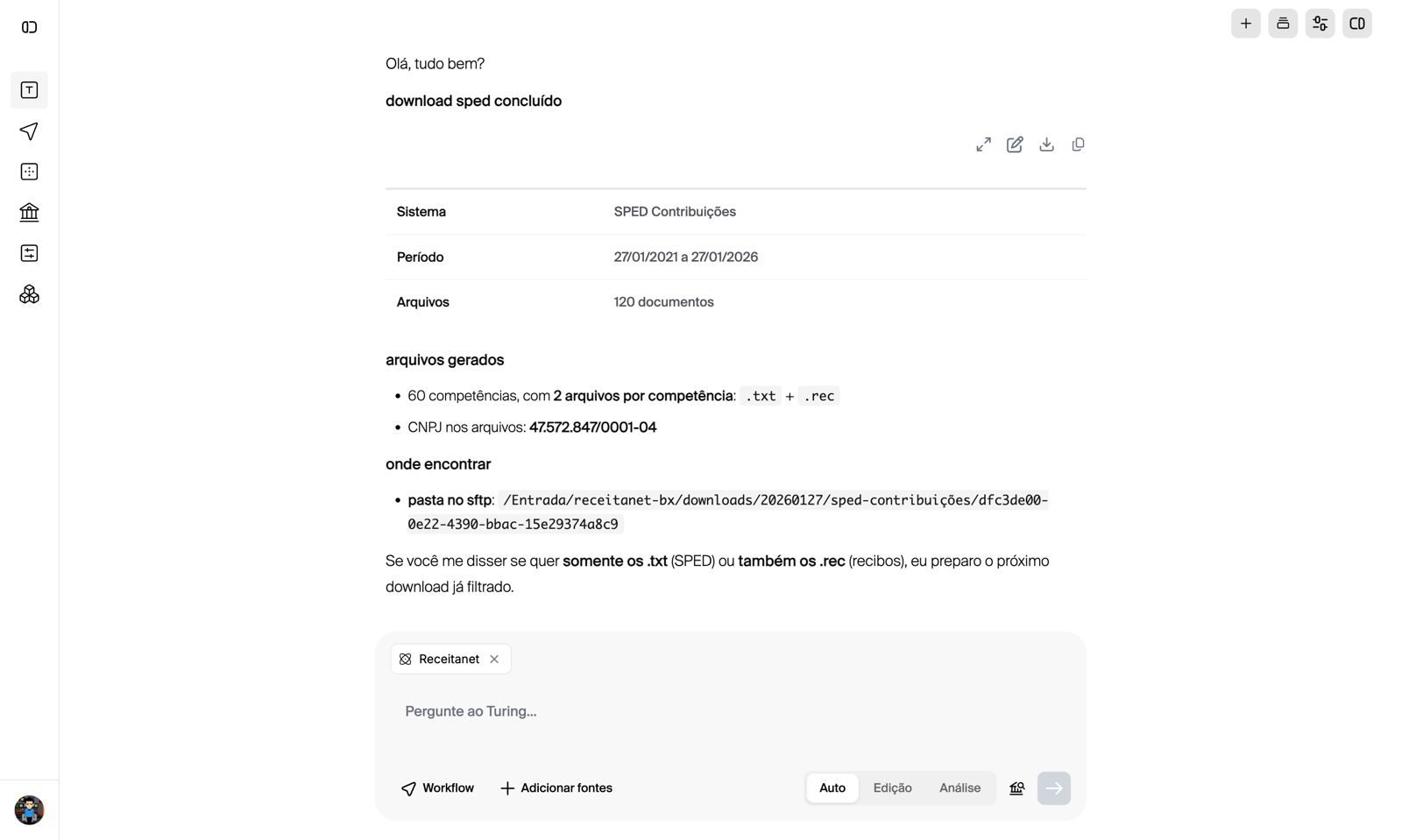
Fig. 01. The delivery message. SPED Contribuições, five years (27/01/2021 to 27/01/2026), 120 files across 60 monthly periods, the CNPJ found in the files, and the SFTP folder. The last line offers to filter the next run to .txt only. - 02
Authentication and the certificate
The agent authenticates the way the analyst would: GOV.BR, digital certificate, proxy-CNPJ. Two scenarios are handled. If the certificate is already installed on the processing machine, the agent selects the correct one for the requested CNPJ. If it is not, the user uploads the certificate to the agent's session over an encrypted channel, and it is used for that run only.
- 03
ReceitaNetBX module
An RPA routine drives the desktop application on a Windows machine in AWS: certificate → proxy → client CNPJ → bookkeeping module → period → search → select all files except EFD-Reinf → download queue. The default window is five years starting on the first day of the month, overridable by the request. Supported modules: SPED Contribuições (PIS/COFINS), SPED Fiscal (EFD ICMS/IPI), SPED Contábil (ECD), SPED ECF, and EFD-Reinf when explicitly asked.
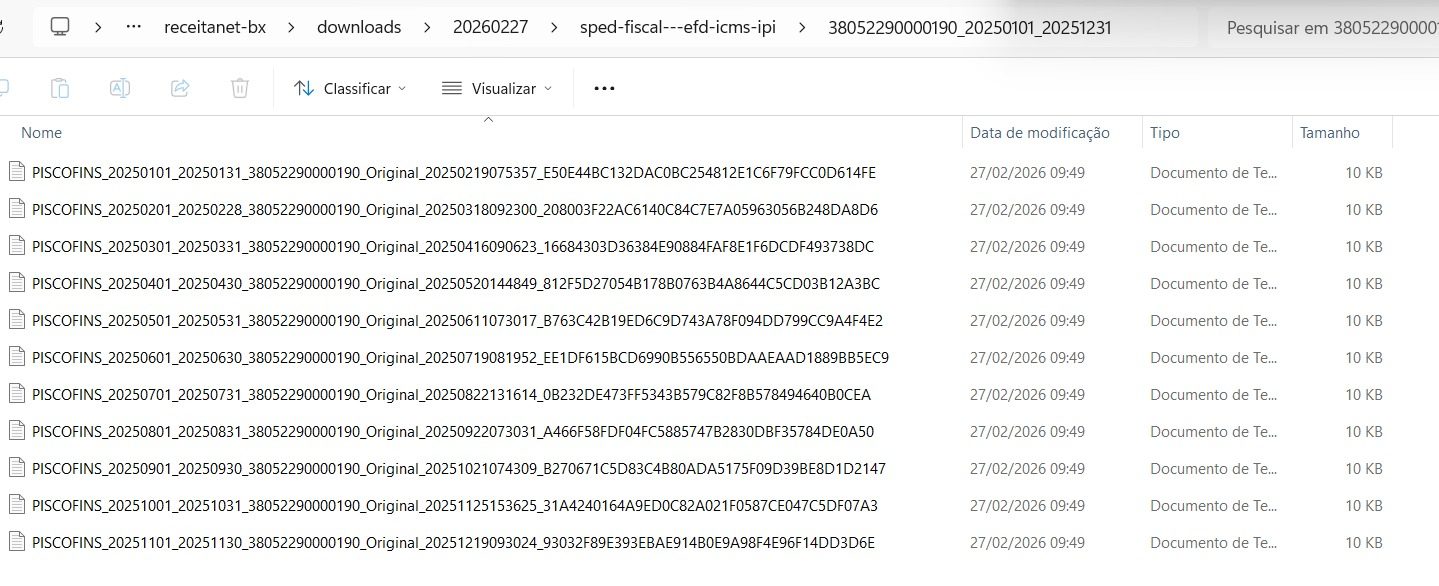
Fig. 02. The run history inside Turing. Each row is one request: SPED type, CNPJ, status (Concluído / Falhou), number of files, fiscal years covered, request date. Runs with zero files and runs that failed are visible, which is the point. - 04
The download queue, watched
A background task monitors the ReceitaNetBX queue for progress and errors. A stalled queue or an authentication problem surfaces as a failed run in the history (Fig. 02), with the reason, instead of an analyst discovering an empty folder the next day.
- 05
Where the files go
Each run gets its own folder under the day's date and the SPED type, named by the run's UUID, then by CNPJ and period. Inside, the files keep ReceitaNetBX's own canonical name: filing type, period start and end, CNPJ, status (Original / Retificadora), transmission timestamp, and the file hash. That name is the audit trail; the agent does not rename it.
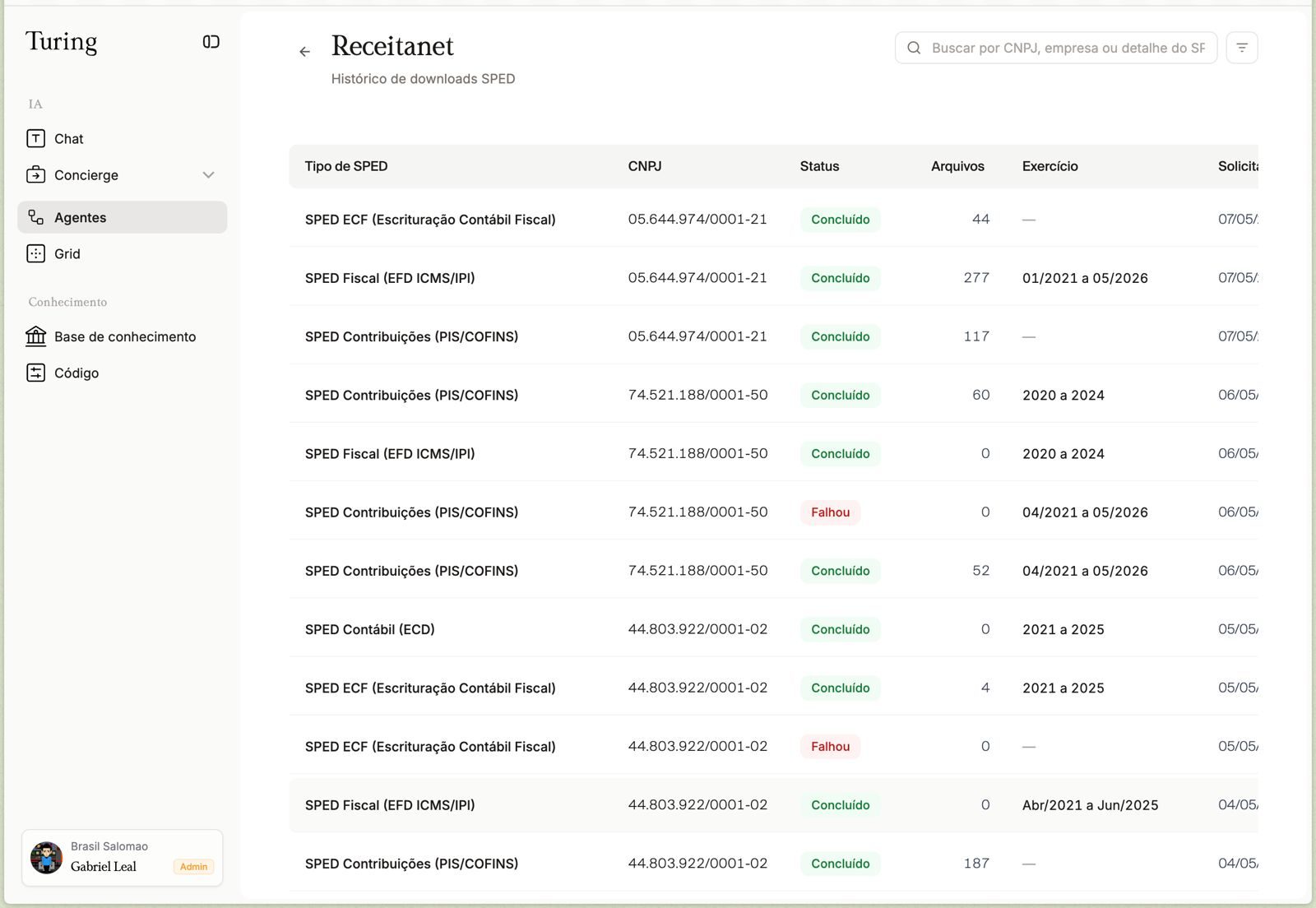
Fig. 03. Four runs, four folders, four UUIDs. One request, one folder, never mixed. 
Fig. 04. receitanet-bx / downloads / 20260227 / sped-fiscal---efd-icms-ipi / 38052290000190_20250101_20251231. Twelve monthly PIS/COFINS files for 2025, one per period, each carrying its status, transmission date and hash. - 06
Amendment logic
Where a filing was rectified, both the original and the rectifying version are downloaded. The agent reads the “Situação” column, identifies the period each file covers, and marks the rectifying file as authoritative. For SPED Fiscal, the “last transmitted file only” option is used when the firm wants a single file per period.
- 07
Post-processing and cleanup
After delivery, the agent removes temporary files from the processing machine, deletes the .rec receipt logs unless the user asked to keep them (the default run in Fig. 01 delivered both .txt and .rec, and the agent offers a filtered next run), and removes superseded originals when the firm's rule is “rectified only”. Nothing sensitive stays on the machine after the task closes.
- 08
ECAC module
Specified alongside, following the same pattern: sign in through GOV.BR with the certificate, select the client as proxy-CNPJ, navigate to Fiscal Status, DCTF, Payment History and Withholding Sources, download the four PDFs, deliver them to the same run folder.
- 09
Architecture
Turing receives the request and dispatches the ReceitaNetBX agent. The RPA runs on a Windows machine inside the client's security group in sa-east-1, with the certificate; results go to the firm's bucket or system. All traffic between user and agent is encrypted.
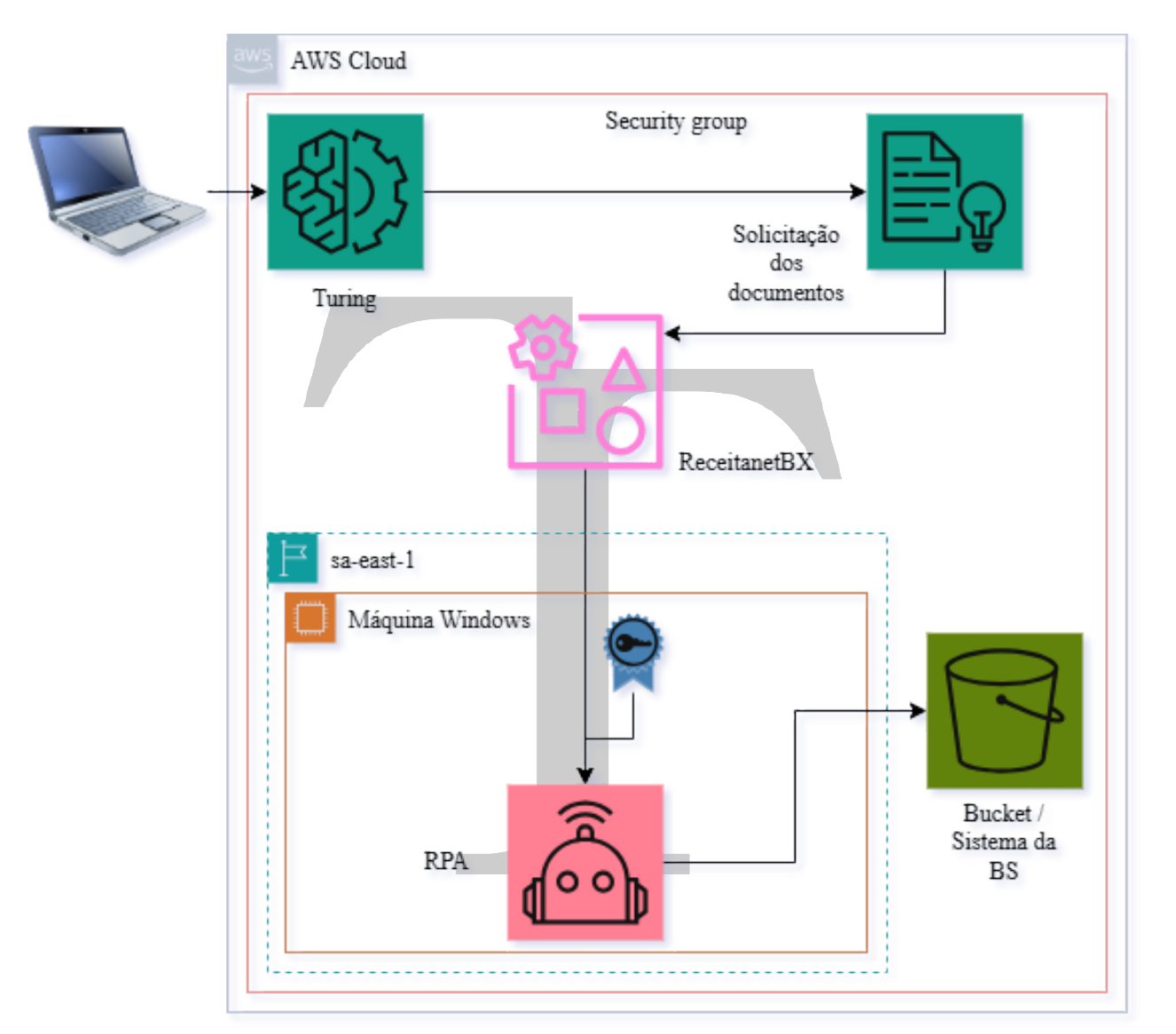
Fig. 05. Turing receives the request and dispatches the ReceitaNetBX agent. The RPA runs on a Windows machine inside the client's security group in sa-east-1, with the certificate; results go to the firm's bucket or system. All traffic between user and agent is encrypted.
- Analyst time inside ReceitaNetBX per client: hours → zero; the request takes one chat message
- 277 SPED Fiscal files, 117 and 187 PIS/COFINS files for single entities pulled in one run each (Fig. 02)
- Full five-year archive per entity, original filenames preserved, rectifications resolved by rule
- Every run, including the failed ones, in the history with CNPJ, type, period, count and status